Managing events can be unpredictable, but with deposit tickets, you can take greater control over attendance and cash flow. By requiring attendees to pay a partial deposit upfront, you ensure a stronger commitment while securing funds ahead of time.
How to set up a Deposit Ticket:
Select DEPOSIT from the Ticket Type dropdown and continue as normal with your available quantity and Base Price. The base price is the initial price you would like the person to pay upfront for the ticket as the initial deposit.
For the Deposit Ticket, you will then be prompted to fill in the Final Payment Price and Final Payment Charge Date.
In this example, the person will pay an initial €50 upfront to secure the deposit ticket and another €45 will be taken from the card automatically on the 21st of January 2025 Totalling €95
By default, all deposit ticket holders will receive an email 7 days before the payment is taken as a reminder.
Automated Communications
Email to send 7 days before payment is to be taken
Dear (Name of booker)
The balance of payment for (Event Name) is (€xxx Final Payment Price, including fees). This payment will be processed on (Final Payment Charge Date). Once payment is received you will receive your tickets.
If you wish to cancel your order, click here (Please note deposit and fees are non-refundable)
Regards,
Eventmaster.
Failed Payment Email to send once payment failed
Dear (Name of booker),
Your payment for (Event Name) failed. Please click on the below payment link to process your payment. Payment Link Please Note This payment link will expire in 24 hours. Once paid you will receive your tickets.
Regards, Eventmaster.
Successful Payment:
Normal Confirmation email with ticket.
Order Management
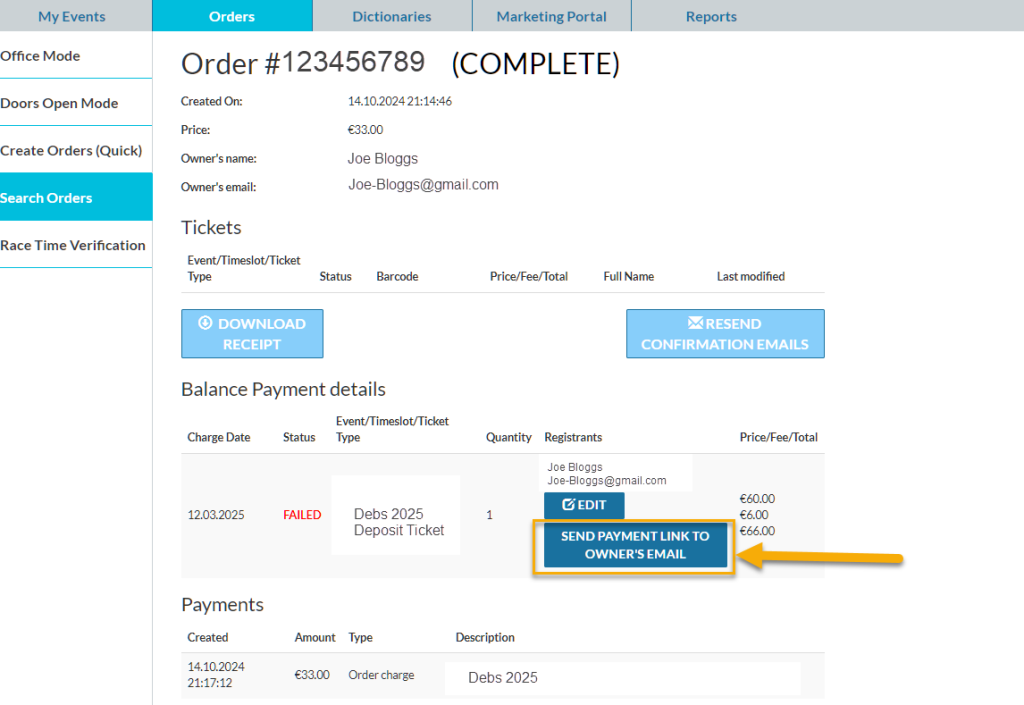
If for any reason the automated payment fails and the person does not pay via the replacement link within 24 hours. Organisers can resend another payment link at anytime to the email address on the order. This can also be edited in the case that the email address was entered incorrectly.
We use cookies on our website to give you the most relevant experience by remembering your preferences and repeat visits. By clicking “Accept”, you consent to the use of ALL the cookies.
This website uses cookies to improve your experience while you navigate through the website. Out of these, the cookies that are categorized as necessary are stored on your browser as they are essential for the working of basic functionalities of the website. We also use third-party cookies that help us analyze and understand how you use this website. These cookies will be stored in your browser only with your consent. You also have the option to opt-out of these cookies. But opting out of some of these cookies may affect your browsing experience.
Necessary cookies are absolutely essential for the website to function properly. This category only includes cookies that ensures basic functionalities and security features of the website. These cookies do not store any personal information.
Any cookies that may not be particularly necessary for the website to function and is used specifically to collect user personal data via analytics, ads, other embedded contents are termed as non-necessary cookies. It is mandatory to procure user consent prior to running these cookies on your website.